CGP
Voting Support Guide
ⓘ An individual voting fanbase dedicated for #세븐틴 #SEVENTEEN and #CARATS | #TeamCGP
by CaratProjects
email: [email protected]
MUSIC SHOW SCHEDULES
| MUSIC SHOW | PRE-VOTE | BROADCAST | LIVE VOTE |
|---|---|---|---|
| SHOW CHAMPION | FRI - 8PM KST to MON - 2PM KST | WEDNESDAY - 6PM KST | NONE |
| MCOUNTDOWN | FRI - 12PM KST to MON - 11:59PM KST | THURSDAY - 6PM KST | THURSDAY - 6PM KST |
| MUSIC BANK | SUN - 3PM KST to WED - 11AM KST | FRIDAY - 5:10PM KST | NONE |
| MUSIC CORE | TUE - 6PM KST to THURS - 11AM KST | SATURDAY - 3PM KST | SATURDAY - 3:15PM KST |
| INKIGAYO | MON - 12PM KST to FRI - 11:59PM KST | SUNDAY - 3:20PM KST | SUNDAY - 3:30PM KST |
MUSIC SHOW GUIDELINES
| MUSIC SHOW | GUIDELINES | VOTINGS |
|---|---|---|
| SHOW CHAMPION | ● CHAMSIMS Red❤: Attendance Ads, Ad Roulette, Missions, Purchase Blue💙: Attendance Ad + level bonus, Quiz, Likeit Community | PRE - VOTE - 900 Chamsims vote per day; 3,600 chamsims to max vote |
| MCOUNTDOWN | ● MNET ACCOUNT Download Mnet App Create Mnet account Join Community 1 vote per IP/Device | PRE - VOTE & LIVE VOTE |
| MUSIC BANK | ● HEARTS Collect hearts by doing tasks/missions Can earn hearts by purchasing Can gift/transfer to other accounts via Username. | PRE - VOTE |
| MUSIC CORE | ● HEARTBEATS Collect beats: 45 beats per day: 3 beats per ad Do Quizzes Join Missions. | PRE - VOTE - Unlimited Vote LIVE VOTE - 150beats: 5 Live Voting Tickets |
| INKIGAYO | ● RUBIES Collect Rubies: 15 rubies per day: 1 Ruby per Ad Diamonds: Paid | LIVE VOTE - 250 Rubies per Account |
MUSIC SHOW CRITERIA
| SHOW CHAMPION | PERCENTAGE | HOW IT'S COUNTED |
|---|---|---|
| DIGITAL | 35% | Bugs, MelOn, Genie, FLO |
| PHYSICAL | 15% | Hanteo Chart |
| SNS | 10% | MV views (YOUTUBE) |
| BROADCAST | 20% | Attending MBC M shows |
| PRE-VOTE | 20% | IDOL CHAMP App Global and China |
| MCOUNTDOWN | PERCENTAGE | HOW IT'S COUNTED |
|---|---|---|
| DIGITAL | 50% | Circle Global Kpop Chart (Bugs, MelOn, Genie, FLO, Vibe, Apple Music, Spotify, Youtube Music) |
| PHYSICAL | 15% | Circle Chart (ALBUM) |
| SNS | 15% | MV views + Short Video |
| BROADCAST | 10% | Attending MCD + the number of times the song/mv played on MNET TV shows |
| PRE-VOTE | 10% | MNET PLUS App |
| LIVE VOTE | 10% | MNET PLUS App |
| MUSIC BANK | PERCENTAGE | HOW IT'S COUNTED |
|---|---|---|
| DIGITAL | 60% | Weekly Top 200 (Bugs, MelOn, Genie, FLO, Vibe Chart) |
| PHYSICAL | 5% | Circle Chart (ALBUM) |
| SNS | 5% | Youtube & Tiktok |
| BROADCAST | 20% | Attending Mubank + the number of times the song/mv played on KBS TV, Radio Digital shows |
| PRE-VOTE | 10% | ALL CHART App |
| MUSIC CORE | PERCENTAGE | HOW IT'S COUNTED |
|---|---|---|
| DIGITAL | 50% | Circle Digital Chart |
| PHYSICAL | 10% | Circle Chart (ALBUM) |
| SNS | 10% | MV views (YOUTUBE) |
| BROADCAST | 10% | the number of times the song/mv played on MBC TV, Radio Digital shows |
| VIEWERS COMITTE | 5% | MBC Viewers Panel Survey |
| PRE-VOTE | 5% | MUBEAT App |
| LIVE VOTE | 10% | MUBEAT App (Global Fans) |
| INKIGAYO | PERCENTAGE | HOW IT'S COUNTED |
|---|---|---|
| DIGITAL | 55% | Circle (for eligible) & MelOn, Genie, FLO (for points) |
| PHYSICAL | 10% | Circle Chart (ALBUM) |
| SNS | 30% | MV views (YOUTUBE) |
| BROADCAST | 10% | the number of times the song played on SBS TV, Radio Shows |
| PRE-VOTE | 5% | DIGGUS App |
| LIVE VOTE | 5% | SUPERSTAR X App |
Criteria Info from: KshowsAnalysis on X
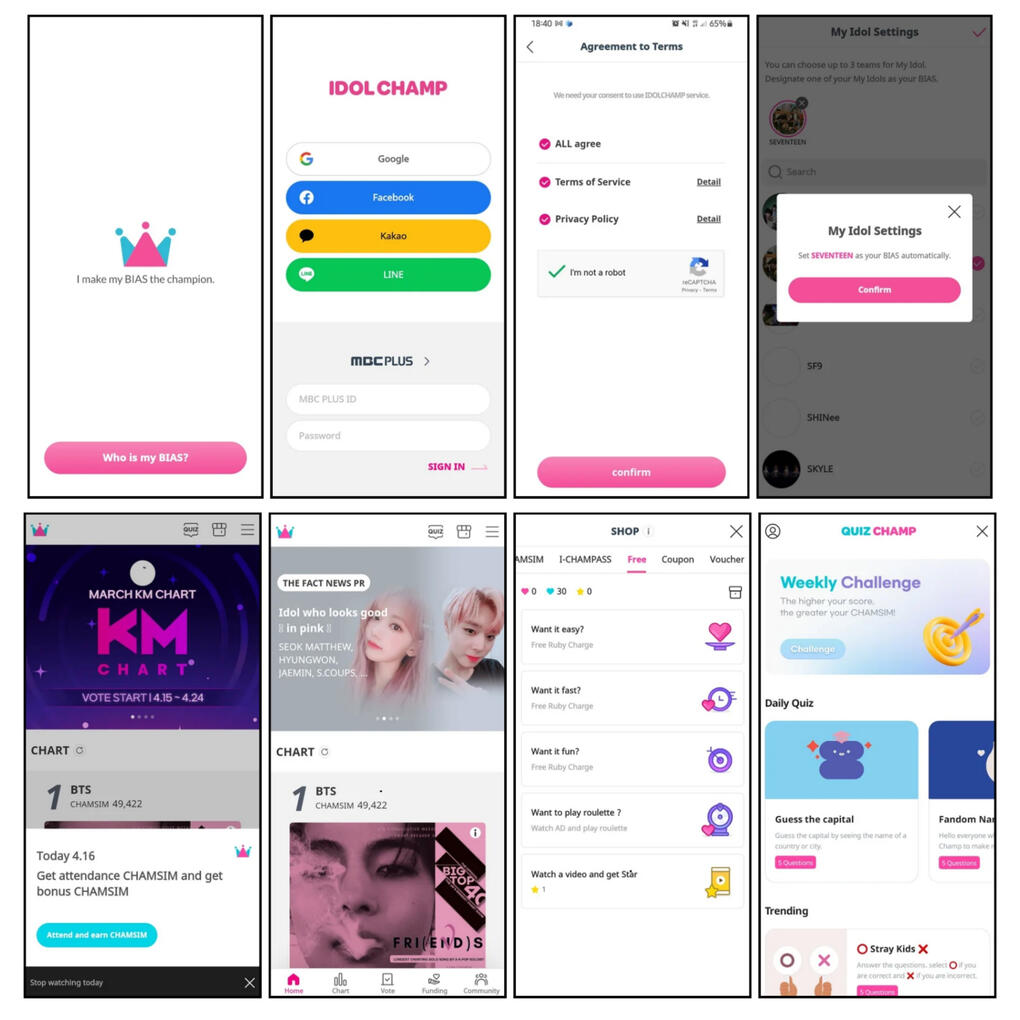
IDOL CHAMP APP TUTORIALTO CREATE ACCOUNT
1. Download Idol Champ app. The app is available for both Google Playstore and Apple Store.
2. Start with "Who is my Bias" and create account (Google, Facebook, Kakao or Line)
3. Confirm agreements to terms.
4. Choose/Add your idol in "Select my Idol" page.
5. Set up photo and nickname on Profile tab.TO COLLECT
"TIME CHAMSIM (BLUE) 💙"
(expires at the end of the month)
Attendance: earn 30💙 by clicking 'Attendance' in the pop-up (the number of time chamsims earned will increase as you level up)
Community Like it: earn 20💙 for more than 30 Like it.
Quiz Champ: Complete quiz to earn 💙 (earning blue chamsims via quiz is only available for the latest 10 quizzes)"RUBY CHAMSIM (RED) ❤"
(ruby chamsims have no expiration date and is available anytime)
Attendance Ad: earn additional 10❤rubies by watching the following ad.
Roulette: Watch ads to spin roulette (Reward: 1 ruby to 100 rubies)
Missions: Complete missions to earn more rubies.
Star-giving: 20% payback once you donate your star on fundraising (the percentage will increase as you level up)"STAR CHAMSIM (YELLOW) ⭐"
(star chamsim can be use by donating under the name of your favorite idol)
Ads: Watch ads to earn star ⭐.
Donate: Star can be converted to Ruby chamsims once donated.TO VOTE
1. Open IDOL CHAMP app
2. Click the Vote tab at the bottom
3. Scroll down and look for (ongoing) ShowChampion
4. Vote for your favorite group
NOTE:
• 100 daily votes per account.
• 1 vote = 3 chamsims.
• 900 chamsims per vote, 3,600 chamsims to max vote.
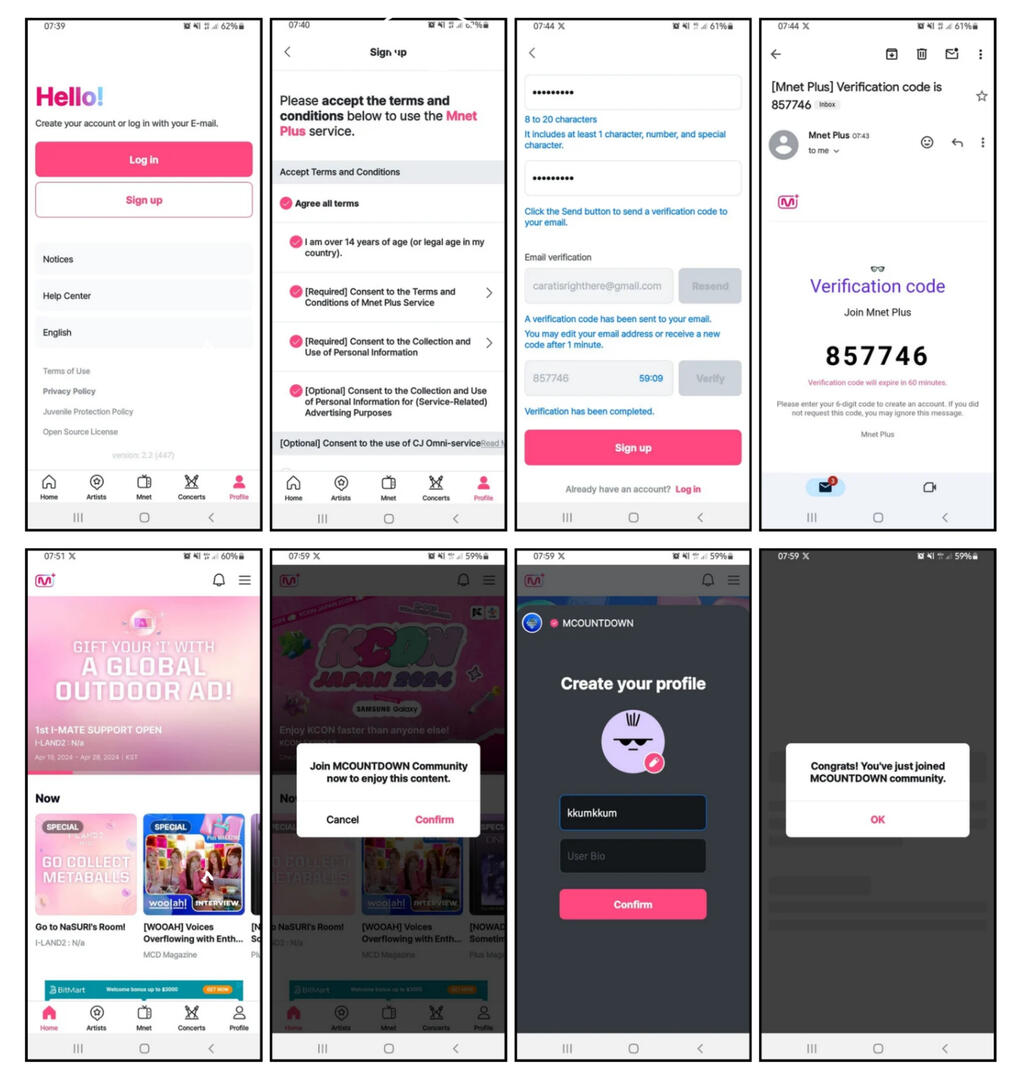
MNET PLUS APP TUTORIALTO CREATE ACCOUNT
1. Download MNET+ app. The app is available for both Google Playstore and Apple Store.
2. To sign up, accept terms and conditions.
3. Fill in details, email verification needed, verify the code to sign up.Join Community: create profile to join community to be able to participate in voting.TO VOTE
1. Click on Mcountdown image (Pre-Vote or Live Vote)
2. Select the artist song (Fave group) then click 'VOTE'
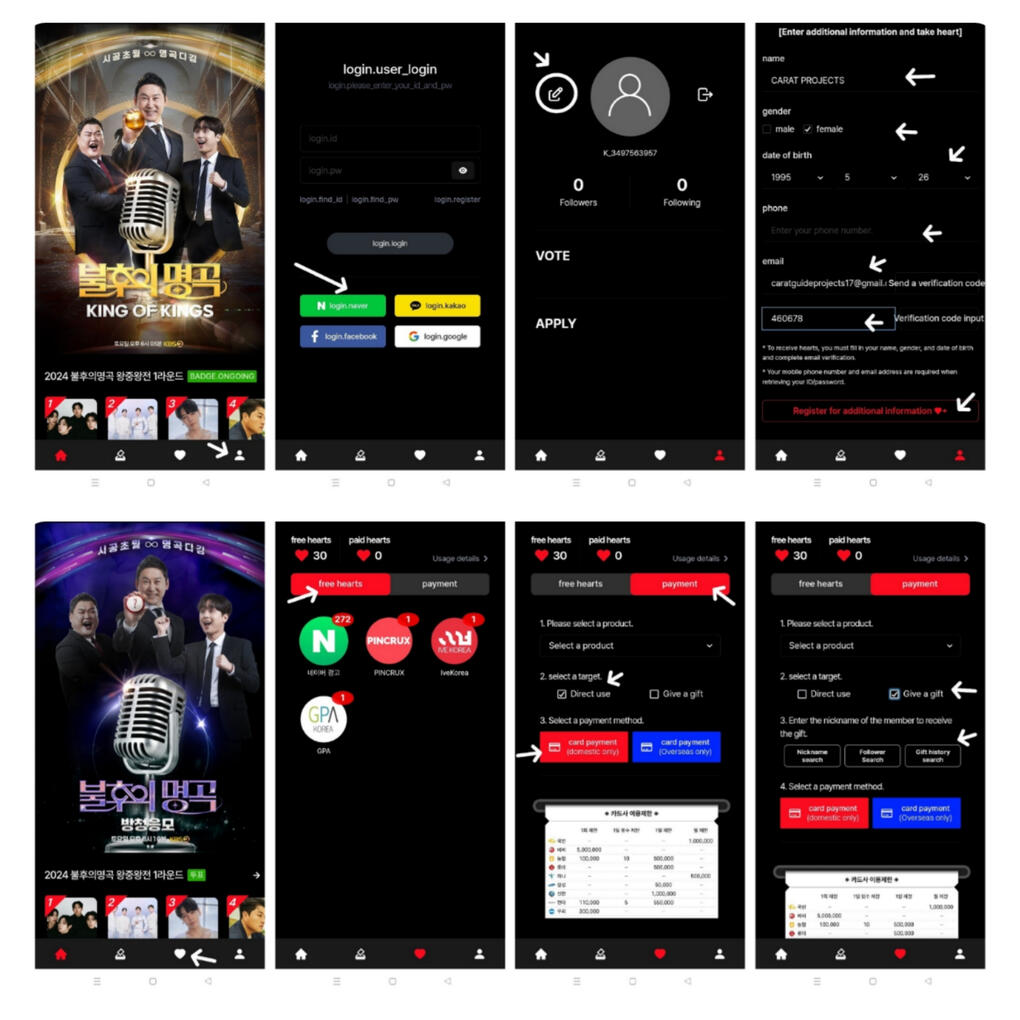
ALL CHART APP TUTORIALTO CREATE ACCOUNT
1. Download ALL CHART app. The app is available for both Google Playstore and Apple Store.
2. Go to Profile icon, then go to "Join our app"
3. Sign up with your preferred account (Naver, Kakaotalk, Faceboor or Google)
4. Edit profile (30 free hearts rewards once you edit additional information & verify your email)TO COLLECT
HEARTS
(hearts will expire every 90 days/3 months)
"TASK/MISSIONS"
Can earn hearts by completing task mission.
Youtube Mission:
- Watch and complete the countdown
IVE KOREA:
- Participate/Register
PINCRUX:
- Follow mission
MEZZO:
- Complete countdown
GPA KOREA:
- Paticipate on Missions
Naver Mission (With and Without Countdown):
Place Save Naver
With Countdown
- Participate to Naver list
- Copy the link on the bottom and paste the text on naver search
- Select the title of article (the one with red box)
- Scroll while waiting on the countdown to end, once the countdown turns green click to check
- Click the star and save to your naver bookmark
Without Countdown
- Participate on Naver list
- Copy the link on the bottom and paste the highlighted text on Naver search
- Select the title of the article (the one with the red box)
- Sign in your naver account
- Click star and save on your naver bookmark
(Place Traffic Naver)
- Participate on Naver list
- Copy the link and paste the text on Naver search
- Click the title of article (the one with red box)
- Scroll down and complete the countdown
- Collect reward by clicking the text on blue box
PURCHASING
- Can buy hearts via Direct use or Send Gift/Transfer to your FriendsTO VOTE
(1 vote = 5 hearts)
- Voting Guideline will follow soon
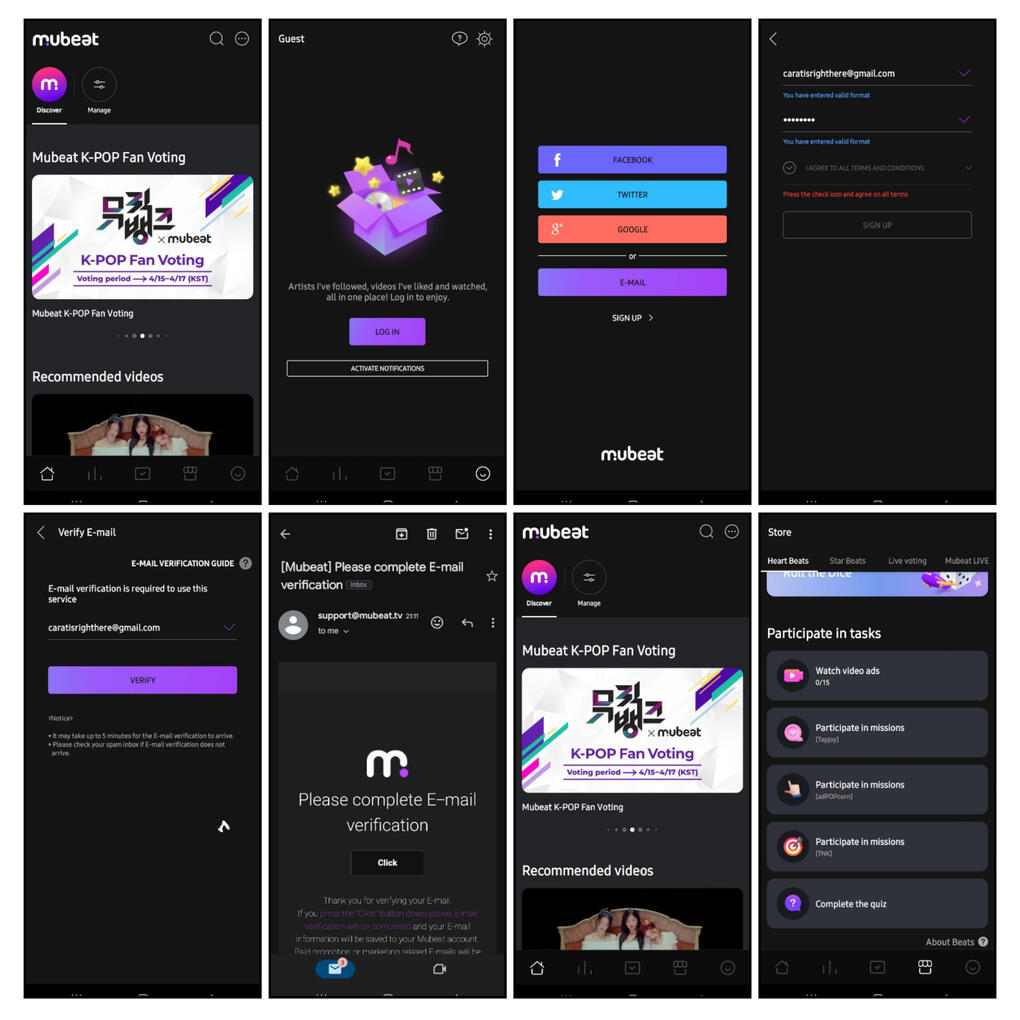
MUBEAT APP TUTORIALTO CREATE ACCOUNT
1. Download Mubeat app. The app is available for both Google Playstore and Apple Store.
2. Click the icon on the lower right side to log in. (Facebook, Twitter or Google)
3. Enter email (must be valid email) and password.
4. Verify the account via Email notice.TO COLLECT
"HEART BEATS"
(beats will expire every 90 days/3 months)
Daily Ads: earn beats by completing daily ads (3 beats per ad: 45 beats)
Quiz: Complete quiz to earn beats (Reward: 10 beats, 20 beats and 30 beats each quiz)
Missions: Do missions and complete the task to earn more beats.TO VOTE
Pre-Vote:
1. Open Mubeat App and tap Vote tab at the bottom.
2. Click 'Show! Music Core' tab.
3. Choose the artist/song you want to vote.
NOTE: unlimited beats to drop
Live Vote:
1. Open Mubeat App and tap store tab at the bottom.
2. Tap 'Live Voting' tab to exchange beats to voting tickets.
3. Click 'Show! Music Core' tab to Vote
4. Choose the artist/song you want to vote.
NOTE: exchange 150 beats to 5 live voting tickets
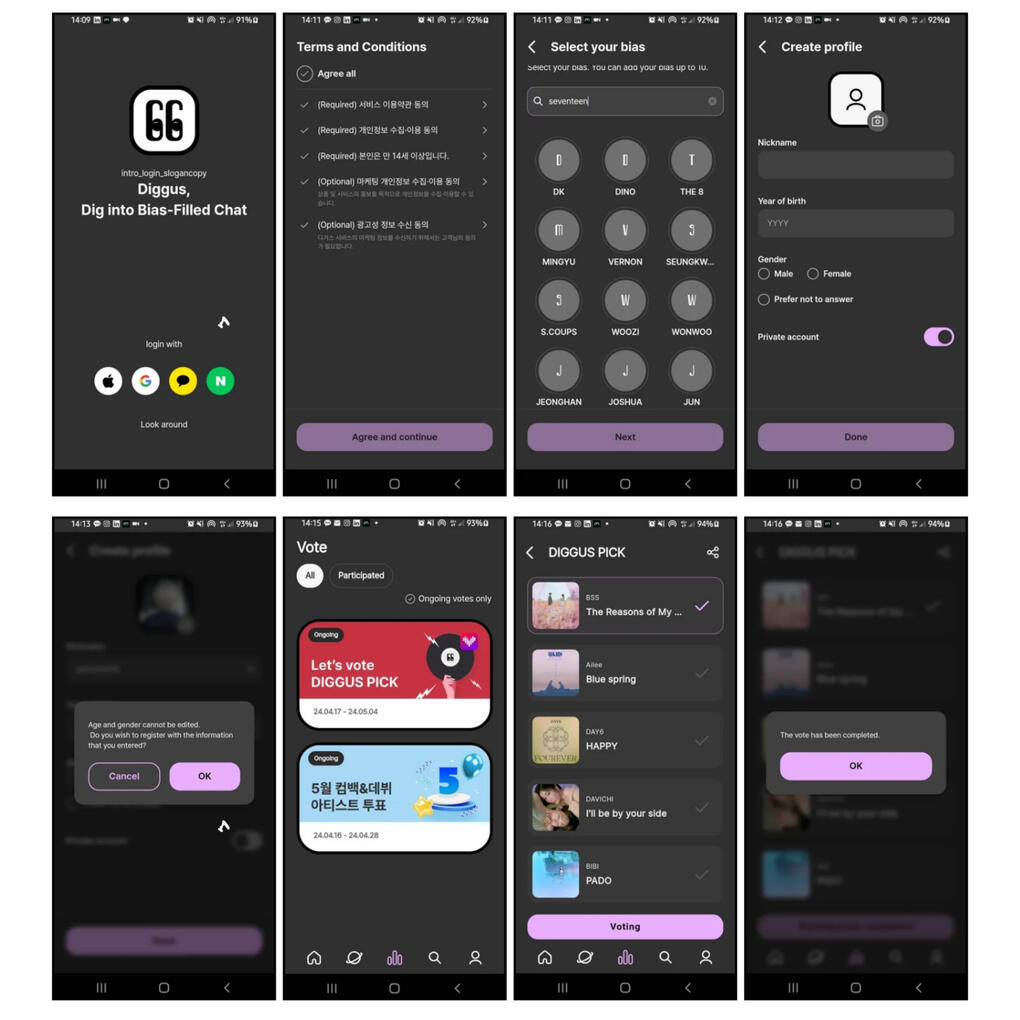
DIGGUS APP TUTORIALTO CREATE ACCOUNT
1. Download Diggus app. The app is available on Google Playstore.
2. Log with (Apple, Google, Kakao or Naver)
3. Select your Bias (can select up to 10)
4. Create Profile then click 'OK' once done.TO VOTE
Vote Tab: click the ongoing vote.
Diggus Pick: select 2 song nominees, scroll and vote, tap 'OK' to confirm
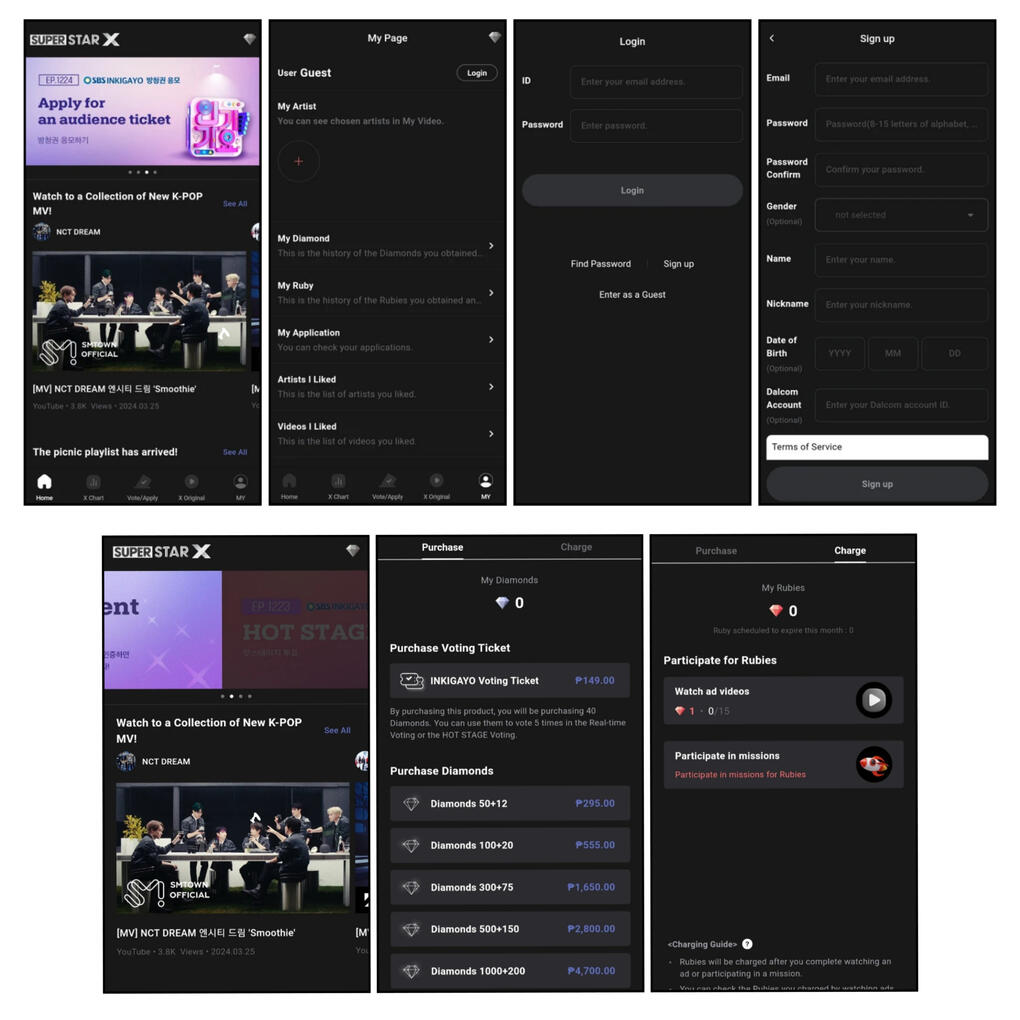
SUPERSTAR X APP TUTORIALTO CREATE ACCOUNT
1. Download Superstar X app. The app is available for both Google Playstore and Apple Store.
2. Click the icon on the lower right side to sign up.
3. Put details that needed to sign up.
4. Start your journey by watching ads everyday and participating in missions.TO COLLECT
"DIAMONDS/RUBIES"
(rubies will expire every 90 days/3 months)
"PURCHASE"
Diamonds: you can purchase diamonds to use for real-time voting or Hot stage Voting. (there is no time expiration period)
"CHARGE"
Rubies: will be charged after you complete watching daily ads. (1 ruby per ad: 15 rubies per day)
Missions: Participate in missions and complete the tasks to earn more rubies.TO VOTE
"Live Vote"
1. Open 'Superstar X' app and click the 'Vote/Apply' tab to vote.
2. Click 'SBS Inkigayo Real-time Voting'
3. Choose the artist/song you want to vote.
NOTE: 250 rubies are needed for Live Voting.